Clean Your Mac Free

EaseUS Software announced today that their software, CleanGenius Pro, is free for a limited time. The software, normally $2.99 on the App Store, claims to feature “the options to fast scan and clean up Mac junk files, completely uninstall unwanted applications, show disk space available, warn clean genius pro icon when the disk space is running low, and eject mounted drives with a brand-new look.”

The reviews posted on the App Store are mixed as to how well this software works, but there are too few of them to judge. It is compatible with OS X 10.6 and above.

Find CleanGenious Pro in the App Store.

Please consider this a courtesy notice for those of you that want to try out new software. I cannot recommend this software, because I haven’t banged on it yet. When I do, I will report my results here (later today). In the meantime, if you want to check it out, please leave your experiences and thoughts here in the comments.

“EaseUS” is registered trademark of CHENGDU Yiwo Tech Development Co., Ltd.

Posted in News | Leave a comment

Slim Down Baby!

It doesn’t matter if you’re a fashionista, clothes horse, makeup glutton, photographer, graphic designer, visual artiste, plus size, emaciated model, or Joe Schmo, you will guffaw.

Just a quickie to get your juices flowing with this creative, witty, and professional “Photoshop” video from YouTube by Jess Rosten. This is an entertaining 2 minutes, that even your Mom will like it!

Fotoshop by Adobé

Thanks to Terry White for this discovery.

Posted in Commentary, Photo | Tagged , , , , , , , | 2 Comments

Busy Week

“Sometimes you’re the windshield; sometimes you’re the bug.”

Mark Knopfler.

This week I feel like the fish!

heron with dinner

Great Blue Heron with Dinner at the South Natick Dam, MA

As promised last week in my “Troubleshooting with Apple Support Docs” article, I have created and uploaded a new page on my site with the latest changes to Apple’s support system. Many of the updated articles cover iOS devices, Apple software (iTunes, Aperture, iPhoto, etc.), and of course, OS X 7, Lion.

Here is the link to my new ilene’s Machine’s Lion Resources page. Enjoy!

All photos included with my posts are ©2012 ilene hoffman. Reuse only with expressed permission.

Posted in Help, Photo | Tagged , , , , , , | Leave a comment

Troubleshooting with Apple Support Docs

It is not always easy to find the help you want in Apple’s Support system. If you do not use their specific search terms you’re often SOL. To avoid this problem, I used to create pages on my web site with a list of troubleshooting articles that were easy to search by keyword in a browser. These pages were not really made for public consumption, but other users did find them helpful. I updated those pages sporadically, and due to various link changes on Apple’s site, they’re only marginally useful now.

I decided to put up a new page with 2012 troubleshooting articles updates from Apple. The full page will be posted on my site (and linked here eventually), but I will post noteworthy updates in this blog for your frustration’s pleasure. These articles not only include troubleshooting tips, but helpful tutorials too. Apple often publishes tutorials which you should read before running out and buying a book that covers way more then you want to know.

The first page you may want to bookmark is Apple’s download page, which links to the most recent software updates. Keep in mind though, just because an update exists, doesn’t mean you have to install it. For example, I recently updated my Brother printer from Apple’s Software Update (in the Apple menu) and I still have not gotten my printer back up on the network! This update caused me more trouble then it’s worth. I should have done my homework before updating, which I’ll talk about more later.

Apple’s troubleshooting tips, hints, and tutorials are useful though, especially if you stumble into an update that offers unexpected results.

Here are updates for the first week of 2012

  • 1/2/12 TS3124 iMovie ’09: Referenced videos from iPhoto Library not displayed in iMovie Event Library
  • 1/5/12 TS4148 iPhone 4S displays ‘No Service’ or ‘No SIM Card Installed’
  • 1/5/12 TS3626 “How to install iMovie, iPhoto, or iTunes using Mac OS X Software Install”
  • 1/6/12 TS1630 iPhone: Can’t hear through the receiver or speakers
  • 1/6/12 TS2799 Tunes Store reporting error – 3259

Here are useful tutorials

  • 1/2/12 HT2506 Mac 101: Preview
  • 1/3/12 HT2488 Mac 101: Automator
  • 1/3/12 HT3737 Mac 101: Desktop
  • 1/4/12 HT2474 Mac 101: The Dock
  • 1/5/12 HT1549 Mac 101: File Sharing
  • 1/7/12 HT2508 Mac 101: Connecting a home stereo, iPod, iPad, musical instruments, or speakers
  • 1/5/12 HT4718 OS X Lion: About Lion Recovery
  • 1/3/12 HT5085 iTunes in the Cloud and iTunes Match Availability
  • 1/4/12 HT4072 Setting up iTunes and DVD Player for digital surround sound
  • 1/6/12 HT1689 iTunes Store:Frequently Asked Questions for iPhone, iPad, and iPod touch
  • 1/6/12 HT5058 iCloud: Microsoft Exchange behavior with iCloud
  • 11/17/11 HT4861 iCloud: Calendar Events, Reminders, To Dos, and Tasks behavior differs by application

So, there you go. You’re on your way to becoming an expert user, if you just read these docs and bookmark the ones you need. Enjoy!

As for a playlist today, I find that music short circuits my ability to remember technical information when I read. If you find that music helps though, you should probably play the tunes that work best with your brain. If you care to share your music that works while reading techie stuff, please leave a comment with the song name and band below so we can give it a listen. Thanks!

Posted in Mac OS & iOS Help | Tagged , , , , | Leave a comment

The Rhythm of Time to be Social

There are articles all over the Web that focus on managing your time while staying connected to your many friends and followers across various sites. Unless you work on the Internet in some fashion, it can be difficult to remember to log into more than 2 or 3 so-called social media sites or even reply to email daily. The black hole of email is a whole ‘nother topic, best left untouched today.

Sonia Simone (article referenced below) only uses two sites (Twitter and Copyblogger) and divides her day into discreet blocks of time. I’ve tried this method, but it just doesn’t work for me. One phone call or critical email, and my schedule gets blown out of the water, not to mention that different social sites offer very different content.

I do block out my time, but in one specific way: My physical therapist has asked me to get up and stretch once an hour. This helps keep me alert and also reduces repetitive stress on my spine, hands, knees, and neck from sitting and typing for hours on end. When I take 10 or more minute breaks, I usually end up cooking, washing dishes, or doing laundry, so they don’t really feel like breaks at all.

As for limiting social media site time, it really depends on what you like to read and whose prose you want to follow. I think setting time limits feels too regimented and may just frustrate you in the end. (This, of course, does not cover game playing, which may need self-enforced time limits or your life oozes away on a virtual farm or in a war on birds.)

Sites of Value
I find Facebook is good if you want to read about what your friends and family are doing. I tend to use it only when I want to relax and catch up. Most people tell me that their Facebook friends are people they know from personal contact, as it is with me.

Twitter is great to keep in touch with news of the day and how your colleagues and friends digest that news. I follow a much wider variety of people on Twitter than on other services. Some are company reps, wildlife enthusiasts, photographers, Apple-industry related professionals, writers, bloggers, educators, artists, and two movie stars.

I love LinkedIn groups because the people in there often ask good questions and you can learn new things from many of the intelligent answers. I belong to groups associated with Apple pros and former staff, Adobe products, photography, social media, and writing.

Google+ is a veritable paradise for photographers. Every time I log in I’m met with a mixture of a gallery of photos and links to most interesting photo tutorials and tidbits. Most of my circles deal with photography in some way and of course Apple/Macintosh things. What content you see all depends on the circles you’ve created and the people with whom you’ve connected. I have a much wider geographic base of connections in Google+ than in any other service.

I also check into MySpace and Reverbnation, because they contain a wide variety of musicians. My son is on both sites and it’s nice to pop in to hear his music and hear what’s new.

I can’t check each service every day, but when I do, I’m never disappointed. There are other sites I also visit periodically, but none that I feel compelled to check regularly.

What services do you prefer? How often do you log in? Please share your thoughts in the Comments section below.

Also if you haven’t left a comment yet in my post about product review ratings, please do! I value your replies. Thank you!

Resources

Leggatt, Helen. Americans resolve to spend less time on social media. BizReport, 1/5/12.
Simone, Sonia. How to Get Any Work Done (When Connecting Is Your Job). Remarkable Communication, 2009.
Allen, David. Time Management in the Age of Social Media. Bloomberg Businessweek, 3/10/09.

Today’s Playlist
A bit of music that gains in energy, to help you get psyched for the coming weekend. Click the album covers to link to Amazon to sample the music.

Morcheeba. “The Sea.” Big Calm. 1998, EastWest U.K.

Stuart Duncan, Chris Thile, Edgar Meyer, Yo-Yo Ma, and Aoife O’Donovan. “Here and Heaven.” The Goat Rodeo Sessions. 2011, Sony Music Entertainment.

Lifehouse. “Halfway Gone.” Smoke & Mirrors. 2010, Geffen Records.

(Disclaimer: The music links have my Amazon Associates code embedded in them, so anything you buy after you click results in my getting a small kickback. Thank you!)


Posted in Commentary | Tagged , , , , , , , , , , , | 2 Comments

Product Rating Schemes

Note to my reader, I’ve moved the Playlist section bottom of the posts.

Product reviews are in progress, but before I publish any of them I need to decide how to represent how I rate products and what criteria to use for the final verdict.

I found myself wondering just what kind of rating system you folks prefer.

12-point dog rating, using my son’s Boston Terrier icon? Boston Terrier icon

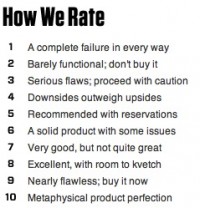
What criteria do need to see to understand how a rating system works? Do you like the overall product scale from 1 to 5 star, thumbs, or whatever icons sites use? (A lovely 5-tree example resides on Jennifer Chiat’s, Growing a Green Family blog.) Or, do you prefer separate ratings for build quality (or manufacturing), hardware design or software interface design, product usefulness, level of user, or other attributes that escape me at this moment. Or, do you prefer Wired’s style, in which they have a complex system of whether you should spare your dime for a product, as shown below?
Wired.com product rating system.
Source: Screen shot from Wired’s “Gear of the Year” page.

Personally, I don’t like the thumbs up or down, or any two criteria system. For example, I often recommend Adobe Photoshop Elements to new photographers who want to edit their shots. Yet, I prefer Photoshop or Lightroom, because I am not crazy about Elements interface. So, personally, the product is a nay, but publicly, it’s a yea.

There is also the problem where a product is made well, serves its purpose, but doesn’t meet the specific reviewer’s needs and may or may not meet your needs. In a 5-point rating system, that product might only get 3.5 points. I don’t particularly like the 2 point or the 5 point systems.

In articles I’ve read, a rating system is what serves to build a reputation. If I rate products inconsistently, then you don’t trust what I have to say and therefore it hurts my reputation as a product reviewer. So, that’s no good.

What I really need to know is: What rating system do you prefer (and can I implement it). Thank you, in advance, for any comments you have.

Playlist (i.e. music to read by) – Easy listening
SuperTramp. “Even In The Quietest Moments.” Gold – Retrospectacle – The Supertramp Anthology. 2005, A&M Records.
Commodores. “Sail On.” All The Great Hits. 2007, Motown Records.
Los Angeles Philharmonic. “Appalachian Spring – (Ballet for Martha).” Copland: Appalachian Spring. 2009, Deutsche Grammophon GmbH, Hamburg.

(Disclaimer: The music links have my Amazon Associates code embedded in them, so anything you buy after you click results in my getting a small kickback. Thank you!)

Posted in Commentary | Tagged , , , , | 4 Comments