There’s a buzz and I’ll tell ya whatsa happenin’ on this Saturday, January 25th–A birthday of sorts! A day late, but that’s what weekends do to you. They make you finagle dates to fit your schedule. Oh, and do not click off this page without scrolling to the bottom or you will miss it. …
The Macintosh computer was introduced to the world on January 24, 1984.
Lives were changed. People were encouraged, some for the first time in their existence, to do something completely different from their neighbors. Strangers became friends and formed groups to help each other learn this new technology.
It wasn’t a cult or a religion, as some would have you believe, it was simply a group of highly intelligent people who believed in wrangling computers out of the hands of the universe of mathematicians and scientists and put it into the laps of everyday people. The amazing tale though, is that even though “they” said it couldn’t be done, the Macintosh is still here and thriving as an alternative machine through which we live our lives, entertain our friends, and share our small corners of our communities with the rest of the world.
While the iPhone/pad/pod may be sexier than the Macintosh, none of them generated the individual revolution /revelation in many of our lives that the came with that little square beige box. Apple didn’t invent the computer, the music player, or the phone, they just slapped on a way to use all these things that is easier for us and put it onto really sensational devices. The iOS devices make accessing things we already had more simple, while the Mac offered a way to play and work that we had never even dreamed of previously.
On January 25, 2014 we celebrate.
Next Saturday some of the most amazing people involved in the creation, development, and support (i.e. users and shakers) of the Macintosh Computer will gather and celebrate at two events which will be commemorated in a poster, testimonials and probably thousands of photos posted to the Web.
Before you run off to dig out your old Mac t-shirts to wear to these events, you should write up your Macintosh story and send it with a photograph to the The Commemorative Poster /Testimonial Campaign. (After you finish reading and watching this page, of course!)
First Event: MacCamp: A Macintosh unconference! This is an informal gathering of people involved with the Macintosh and everyone is invited. The gathering is a warm-up to the official anniversary event later that night. People are encouraged to bring a bag of Mac memorabilia for show and tell to share with the group. Organized by Raines Cohen, one of the Berkeley Mac User Group (BMUG) Founders, this informal gathering will be populated with a variety of former Apple employees and Macintosh users. Entrance is free, but there is a $20 suggested donation. You can sign up for this on Eventbrite.
Where: Fireside Room of the Student Center at DeAnza College, Cupertino, CA.
When: Saturday, Jan. 25, 2014, 10 am to 5 pm PT.
Second Event: The Macintosh Thirtieth Anniversary Event. An organized celebration of the birth of the Macintosh. Former Macintosh development team members and friends will wow over 1000 people at the Flint Center, where they introduced the Mac, in Cupertino, CA.
From the Mac 30th Celebration web site: Panels include Conception—moderated by John Markoff and features Daniel Kottke, Larry Tesler, Marc LeBrun, Bill Fernandez and one other (TBA). The second Panel, The Birth of the Mac—moderated by Steven Levy, and will feature Bill Atkinson, Randy Wigginton, Andy Hertzfeld, Bruce Horn, and George Crow and Caroline Rose. “The audience will be able to hear first-hand stories from these panelists and others about the real stories behind the birth of the Macintosh.” The third panel, the Coming of Age of Mac—moderated by Dan Farber and features well known 3rd party developers like Charlie Jackson, Jim Rea, Heidi Roizen, Ty Roberts, David Bunnell, Marc Canter, Maryline Delbourg Delphis, Adam Hertz and Steve Jasik focusing on the software necessary for the Mac to gain critical mass. The Macworld All-Star band will also perform.
Where: The Flint Center at DeAnza College, Cupertino, CA.
When: Saturday, Jan. 25, 2014, 7 pm to 10:30 pm PT. (Doors open at 6 pm.)
Tickets: $110 to $141 at Ticketmaster. All Proceeds after Expenses go to Coder Dojo.
You can read about some of the folks who are going on Facebook.
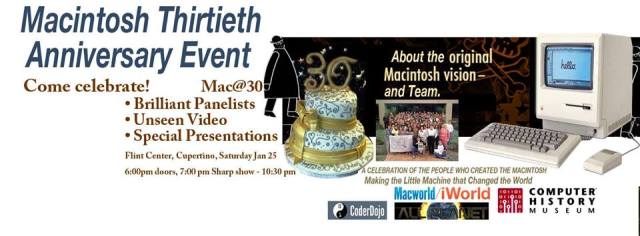
Macintosh Thirtieth Anniversary Event Banner
Third Event: I hear rumors that there will be an after-party. I suspect there will be many after-parties. Small gatherings in the bars, restaurants, hotels, and inns across Cupertino will surely happen. If you go to one of the other two events, keep your ears open for murmurs of gatherings.
Fourth Event: If you are like me and cannot make this amazing celebration of the Mac’s 30th birthday, do not despair! Macworld/iWorld is coming March 27 to 29 and there will be some fun parties! You have plenty of time to make reservations and join one of the few remaining “trade” shows that highlights only products that are compatible with all Apple created devices. Plus, according to tradition, the Hess Memorial Macworld Events List will bring you all the parties, gatherings, and notable conferences in one place on it’s abysmally out of date looking web page!
** NEW 1/27/14: Fifth Event: An Apple Alumni Reunion.
Thanks to Scott Knaster for this video!
Updated with newest links at 12 am and 5:30 am ET 1/23/14.








 ilenes machine
The Macintosh Hits 30 and We Celebrate
There’s a buzz and I’ll tell ya whatsa happenin’ on this Saturday, January 25th–A birthday of sorts! A day late, but that’s what weekends do to you. They make you finagle dates to fit your schedule. Oh, and do not click off this page without scrolling to the bottom or you will miss it. …
The Macintosh computer was introduced to the world on January 24, 1984.
Lives were changed. People were encouraged, some for the first time in their existence, to do something completely different from their neighbors. Strangers became friends and formed groups to help each other learn this new technology.
It wasn’t a cult or a religion, as some would have you believe, it was simply a group of highly intelligent people who believed in wrangling computers out of the hands of the universe of mathematicians and scientists and put it into the laps of everyday people. The amazing tale though, is that even though “they” said it couldn’t be done, the Macintosh is still here and thriving as an alternative machine through which we live our lives, entertain our friends, and share our small corners of our communities with the rest of the world.
While the iPhone/pad/pod may be sexier than the Macintosh, none of them generated the individual revolution /revelation in many of our lives that the came with that little square beige box. Apple didn’t invent the computer, the music player, or the phone, they just slapped on a way to use all these things that is easier for us and put it onto really sensational devices. The iOS devices make accessing things we already had more simple, while the Mac offered a way to play and work that we had never even dreamed of previously.
On January 25, 2014 we celebrate.
Next Saturday some of the most amazing people involved in the creation, development, and support (i.e. users and shakers) of the Macintosh Computer will gather and celebrate at two events which will be commemorated in a poster, testimonials and probably thousands of photos posted to the Web.
First Event: MacCamp: A Macintosh unconference! This is an informal gathering of people involved with the Macintosh and everyone is invited. The gathering is a warm-up to the official anniversary event later that night. People are encouraged to bring a bag of Mac memorabilia for show and tell to share with the group. Organized by Raines Cohen, one of the Berkeley Mac User Group (BMUG) Founders, this informal gathering will be populated with a variety of former Apple employees and Macintosh users. Entrance is free, but there is a $20 suggested donation. You can sign up for this on Eventbrite.
Where: Fireside Room of the Student Center at DeAnza College, Cupertino, CA.
When: Saturday, Jan. 25, 2014, 10 am to 5 pm PT.
Second Event: The Macintosh Thirtieth Anniversary Event. An organized celebration of the birth of the Macintosh. Former Macintosh development team members and friends will wow over 1000 people at the Flint Center, where they introduced the Mac, in Cupertino, CA.
From the Mac 30th Celebration web site: Panels include Conception—moderated by John Markoff and features Daniel Kottke, Larry Tesler, Marc LeBrun, Bill Fernandez and one other (TBA). The second Panel, The Birth of the Mac—moderated by Steven Levy, and will feature Bill Atkinson, Randy Wigginton, Andy Hertzfeld, Bruce Horn, and George Crow and Caroline Rose. “The audience will be able to hear first-hand stories from these panelists and others about the real stories behind the birth of the Macintosh.” The third panel, the Coming of Age of Mac—moderated by Dan Farber and features well known 3rd party developers like Charlie Jackson, Jim Rea, Heidi Roizen, Ty Roberts, David Bunnell, Marc Canter, Maryline Delbourg Delphis, Adam Hertz and Steve Jasik focusing on the software necessary for the Mac to gain critical mass. The Macworld All-Star band will also perform.
Where: The Flint Center at DeAnza College, Cupertino, CA.
When: Saturday, Jan. 25, 2014, 7 pm to 10:30 pm PT. (Doors open at 6 pm.)
Tickets: $110 to $141 at Ticketmaster. All Proceeds after Expenses go to Coder Dojo.
Macintosh Thirtieth Anniversary Event Banner
Third Event: I hear rumors that there will be an after-party. I suspect there will be many after-parties. Small gatherings in the bars, restaurants, hotels, and inns across Cupertino will surely happen. If you go to one of the other two events, keep your ears open for murmurs of gatherings.
Fourth Event: If you are like me and cannot make this amazing celebration of the Mac’s 30th birthday, do not despair! Macworld/iWorld is coming March 27 to 29 and there will be some fun parties! You have plenty of time to make reservations and join one of the few remaining “trade” shows that highlights only products that are compatible with all Apple created devices. Plus, according to tradition, the Hess Memorial Macworld Events List will bring you all the parties, gatherings, and notable conferences in one place on it’s abysmally out of date looking web page!
** NEW 1/27/14: Fifth Event: An Apple Alumni Reunion.
Thanks to Scott Knaster for this video!
Updated with newest links at 12 am and 5:30 am ET 1/23/14.